AVRAM BYTEWAVE_LLC PayPal Scam – How a ₹0.11 Transaction Can Trap You
Cyber scams are getting smarter every day.
Recently, a new scam under the name “AVRAM BYTEWAVE_LLC” is targeting PayPal users—and the dangerous part is that it looks 100% real.
You received:
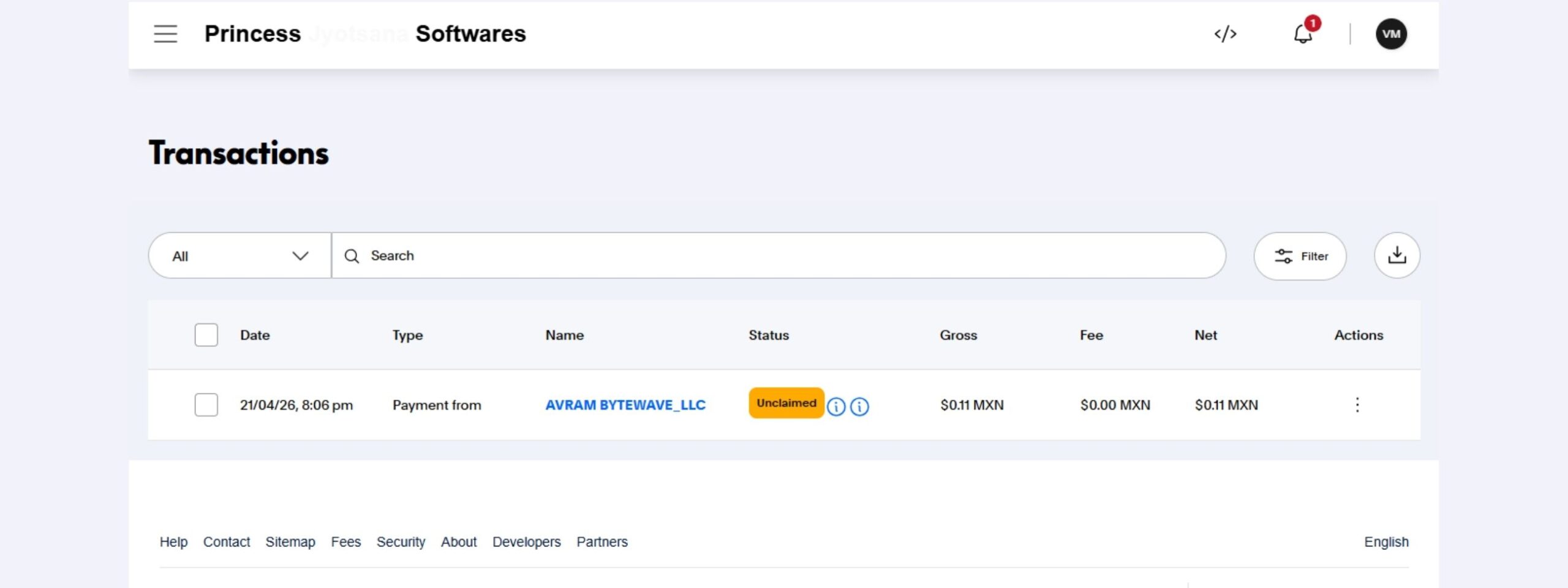
- A real PayPal transaction ($0.11 MXN)
- A fake email claiming $987.90 pending deposit
- A phone number to call
And yes—this is a scam.
Real Proof (My Case)
From your shared screenshot:
- Payment from: AVRAM BYTEWAVE_LLC
- Amount: $0.11 MXN
- Status: Unclaimed
And email says:
“Pending deposit of USD 987.90 for account activation. Call (888) 585-6405”
This exact pattern is confirmed in your email screenshot
What Exactly Is This Scam?
This is called a “Micro-transaction phishing scam”
Here’s how it works:
- Scammer sends you a small real payment (₹5–₹10 equivalent)
- You receive a real PayPal notification
- Then they send a fake email claiming large money pending
- They push you to call a fake support number
- Once you call → they try to:
- Steal your login
- Access your system
- Ask for OTP / bank details
👉 According to recent reports, scammers use real transactions to build trust and then trap users via fake support calls
Why This Scam Is Dangerous
This is not a normal phishing email.
This is advanced social engineering because:
- Payment is real
- Email looks like PayPal
- Your name is included
- Transaction actually appears in your PayPal
That’s why most people believe it.
Red Flags You Should Notice
If you see these signs → it’s a scam:
- “Pending deposit for account activation”
- Asking to call a number
- Very small payment (₹1–₹10)
- Urgency like “Activate now”
- Random foreign currency (MXN, PHP etc.)
Important – PayPal Never Does This
PayPal never:
- Asks you to call random numbers
- Sends activation deposits like this
- Requests OTP or passwords via phone/email
Even PayPal warns users not to share credentials via calls or emails
What You Should Do Immediately
If you receive this:
Step 1: Do NOT call the number
That’s the trap.
Step 2: Ignore or refund the payment
No harm in small deposit.
Step 3: Check PayPal directly
Login manually—not from email links.
Step 4: Change password (if unsure)
Step 5: Report phishing to PayPal
Forward email to: spoof@paypal.com
If You Already Called Them
Take action immediately:
- Change PayPal password
- Enable 2FA
- Check bank transactions
- Inform your bank if needed
Final Truth
This scam is clever because:
“They don’t hack you… they make you trust them.”
And once trust is built, people give access themselves.
Awareness Message
If you received this message:
- You are NOT alone
- This is a known scam
- Your money is NOT at risk unless you interact